Publishing Logs & Error Telemetry
Publishing Logs & Error Telemetry - Step-by-step user manual, real-world practical use cases, and automation workflows for Siegfried Outreach Platform.
Social Publishing Telemetry & Error Intelligence
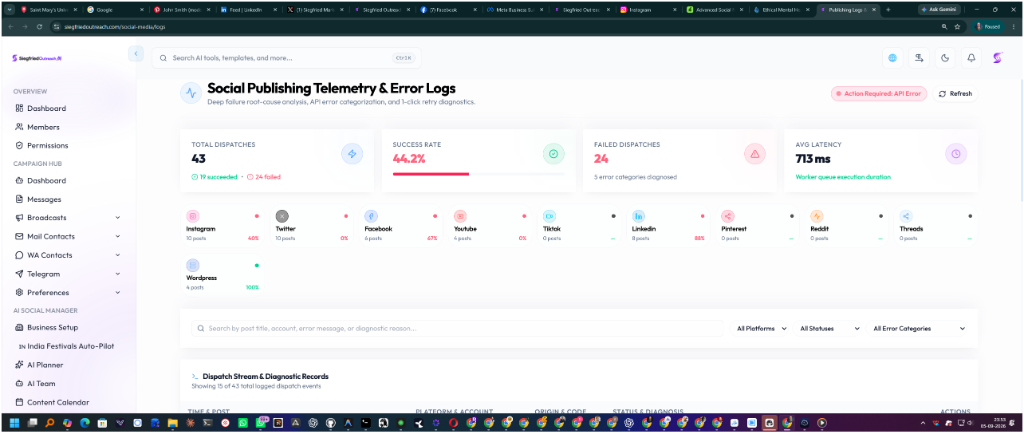
🔍 Telemetry Dashboard Screenshot: Real-time gateway status, platform health tiles, and diagnostic error inspector.
The Publishing Logs & Telemetry Dashboard (/social-media/logs) gives total transparency into every social post dispatch across all connected networks (X/Twitter, Instagram, Facebook, YouTube, TikTok, LinkedIn, Pinterest, Reddit, WordPress).
🔍 Automated Error Categorization
Every failed dispatch is automatically analyzed by the Telemetry Engine and categorized into actionable buckets:
API_CREDITS_DEPLETED: Third-party API balance empty (e.g. X/Twitter HTTP 402).AUTH_TOKEN_EXPIRED: OAuth access token expired or revoked.PERMISSION_DENIED: Missing admin or publisher permissions on the Facebook/LinkedIn Page.RATE_LIMIT_EXCEEDED: Daily or hourly posting threshold reached.MEDIA_PROCESSING_FAILED: Video resolution, codec, or aspect ratio rejected by the platform.CONTENT_POLICY_VIOLATION: Blocked keywords or restricted links.NETWORK_TIMEOUT/SYSTEM_ERROR: Worker queue network hiccups.
🛠️ Diagnosing and Retrying Failed Posts:
- Open Social Studio ➔ Publishing Logs (
/social-media/logs). - View the System Health Pill and Platform Health Tiles at the top.
- Click Inspect on any failed log to open the root-cause diagnostic drawer.
- Review the bilingual explanation, origin tag (Social Media API vs System), and actionable resolution checklist.
- Fix the issue (e.g. recharge API credits or re-link token) and click Retry Now to dispatch immediately.
🏢 Real-World Industry Use Cases & Practical Examples (वास्तविक उद्योग उपयोग और उदाहरण)
🏢 1. Digital Marketing Agency Managing 30 Client Accounts
- Problem: An agency manages 30 Twitter/X accounts. Suddenly, posts for 4 clients start failing during a flash product launch.
- How Telemetry Solves It:
- The account manager opens Publishing Logs (
/social-media/logs). - The system immediately flags Status: HTTP 402 - Credits Depleted under the
API_CREDITS_DEPLETEDbucket with the explanation: "Twitter API developer credit balance is empty". - The agency tops up the X Developer wallet, returns to the logs dashboard, and clicks 1-Click Retry.
- All 4 failed posts are instantly published within 60 seconds without missing the client launch deadline.
- The account manager opens Publishing Logs (
⚡ 2. High-Growth SaaS Product Launch
- Scenario: A startup schedules 50 announcements on LinkedIn, YouTube, and Facebook.
- Outcome: The team monitors the real-time Latency Gauge (e.g. 420ms) and System Health Badge ensuring all multi-network webhooks succeed with 100% verification.
🏷️ Related Feature Keywords & Search Tags (संबंधित कीवर्ड्स और टैग्स)
#PublishingLogs #ErrorTelemetry #TwitterHTTP402 #CreditsDepleted #AuthTokenExpiry #OneClickRetry #DiagnosticRootCause #SocialMediaDebugging
Interactive Social Calendar
Interactive Social Calendar - Step-by-step user manual, real-world practical use cases, and automation workflows for Siegfried Outreach Platform.
Multi-Platform Ads Managers
Multi-Platform Ads Managers - Step-by-step user manual, real-world practical use cases, and automation workflows for Siegfried Outreach Platform.