5-Minute Quickstart
5-Minute Quickstart - Step-by-step user manual, real-world practical use cases, and automation workflows for Siegfried Outreach Platform.
🚀 5-Minute Quickstart Guide
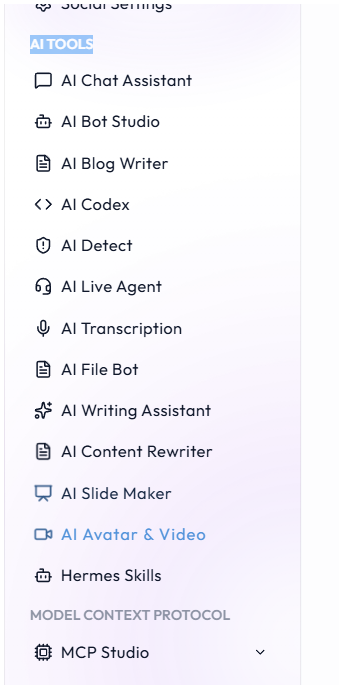
⚡ Platform Navigation: Comprehensive AI tools suite, Campaign Hub, Social Studio, and MCP Studio.
Get up and running with Siegfried Outreach in just a few simple steps.
Sign in to Your Account
Visit siegfriedoutreach.com/login and log in with your account credentials or Google single sign-on.
Connect Your Social Accounts
Navigate to Social Media > Accounts or click Connect Account in the sidebar. Select your target platforms (e.g., Instagram, YouTube, X, LinkedIn, TikTok) and grant OAuth permissions.
Create Your First Post
Go to Social Media > Create Post (/social-media/create-post).
- Select your target social channels at the top.
- Enter your post title, caption, and hashtags.
- Attach images or upload vertical video (9:16).
Preview & Publish
Check the Live Feed Preview on the right side of the screen to see how your post will render on mobile and desktop feeds. Click Publish Now or schedule it on the Calendar.
Pro Tip: You can save unfinished posts using the Save as Draft button without spending any AI credits.
🏢 Real-World Use Case & Quickstart Case Study (वास्तविक केस स्टडी)
🚀 1. Solo Entrepreneur / Content Creator Launching in 15 Minutes
- Scenario: A business coach with accounts on YouTube, Instagram, and LinkedIn wants to set up automated publishing without getting overwhelmed by complex technical setups.
- Quickstart Execution:
- Logs in and connects all 3 social accounts via OAuth in 2 minutes.
- Generates 7 days of motivational quote posts using AI Writing Assistant.
- Schedules them into the Content Calendar to post daily at 9:00 AM.
- Outcome: Completely automated 1 week of consistent social branding in less than 15 minutes.
🏷️ Related Feature Keywords & Search Tags (संबंधित कीवर्ड्स और टैग्स)
#SiegfriedOutreach #QuickstartGuide #SocialMediaSetup #AICopilot #MarketingAutomation #OmnichannelPlatform #OnboardingTutorial
🚀 100x 1-Week Sales Growth Blueprint
🚀 100x 1-Week Sales Growth Blueprint - Step-by-step user manual, real-world practical use cases, and automation workflows for Siegfried Outreach Platform.
Connecting Social Networks
Connecting Social Networks - Step-by-step user manual, real-world practical use cases, and automation workflows for Siegfried Outreach Platform.